



|
WA8LMF Home Page | Updated 05 Juily 2022 |
UZ7HO Soundmodem Software TNC
(Jumps down this page)
AGW Packet Engine 2010-805 Installer (Standard freeware version of AGWpe repacked into an automated Windows installer.)
APRS-Emergency_Full-Ver-1.11.exe (Plug-In for UI-View)
APRS-Emergency-Ver-1.23-Update
APRS symbols for UIpoint-RevH.zip
APRS symbols for UIview-RevH.zip
APRS Symbols for APRSplus-RevH.zip
ARRL_US-BandPlan-March-2012.pdf
CheckSR-Setup.exe Checks Sound Card Sample Rate
ComDisable.msi Disables enumeration of serial port devices at boot on
Windows PCs. Prevents mouse cursor from going nuts
when PC is booted with a serial GPS device connected.
Details here on this site: GPS_Mouse.htm
| Daylight Time Patches for Windows
U.S. Daylight Time now starts 3 weeks earlier than the traditional date (1st week of March instead of beginning in April), effective the year 2007. As a result, the automatic time change feature in Windows XP and earlier versions won't happen until 3 weeks after the fact. The patches below will fix Windows to change on the proper dates. These patches only affect the Windows operating system itself. If you use Outlook, another patch (available from Microsoft) is required. Outlook keeps time internally in UTC and converts to local time only for display, using a routine similar to, but separate from, the one in Windows itself. Note that an intractable problem remains because MS grouped the US and Mexico together in the time zone select dialog in Windows (for example, "US Pacific and Tijuana, Mexico"). Since Mexico, unlike Canada, didn't slavishly follow the U.S. in this daylight time change idiocy, either you patch Windows and the U.S. west shows correctly and Mexico doesn't. Or you don't patch to keep Mexico correct and the U.S. incorrect by an hour. This nuisance will only persist for three weeks until the classic date for daylight change. At this point both the US and Mexico will be on daylight time, allowing the same offset to be correct for both. |
2007 Daylight Time Fix for Windows 2000 & XP
This update (courtesy of http://www.intelliadmin.com, a vendor of corporate network management software, fixes the daylight time change issue. Note that after installing this patch, you will have to reset the time, using an Internet utility or other means. This forces Windows to re-compute the offset between UTC time (which the operating system uses internally) and the local time zone (which used for on-screen display). Or download the "official" XP patch from the Microsoft website here.
2007 Daylight Time Fix for Windows 98 and ME
Another freebie from http://www.intelliadmin.com, similar to the one above, but for Win 98 and ME.
DegreeMinuteSecondConverter.exe
Handy coordinates conversion tool from a defunct software company. Converts between DD.dddddd , DD MM SS and DD MM.mm .
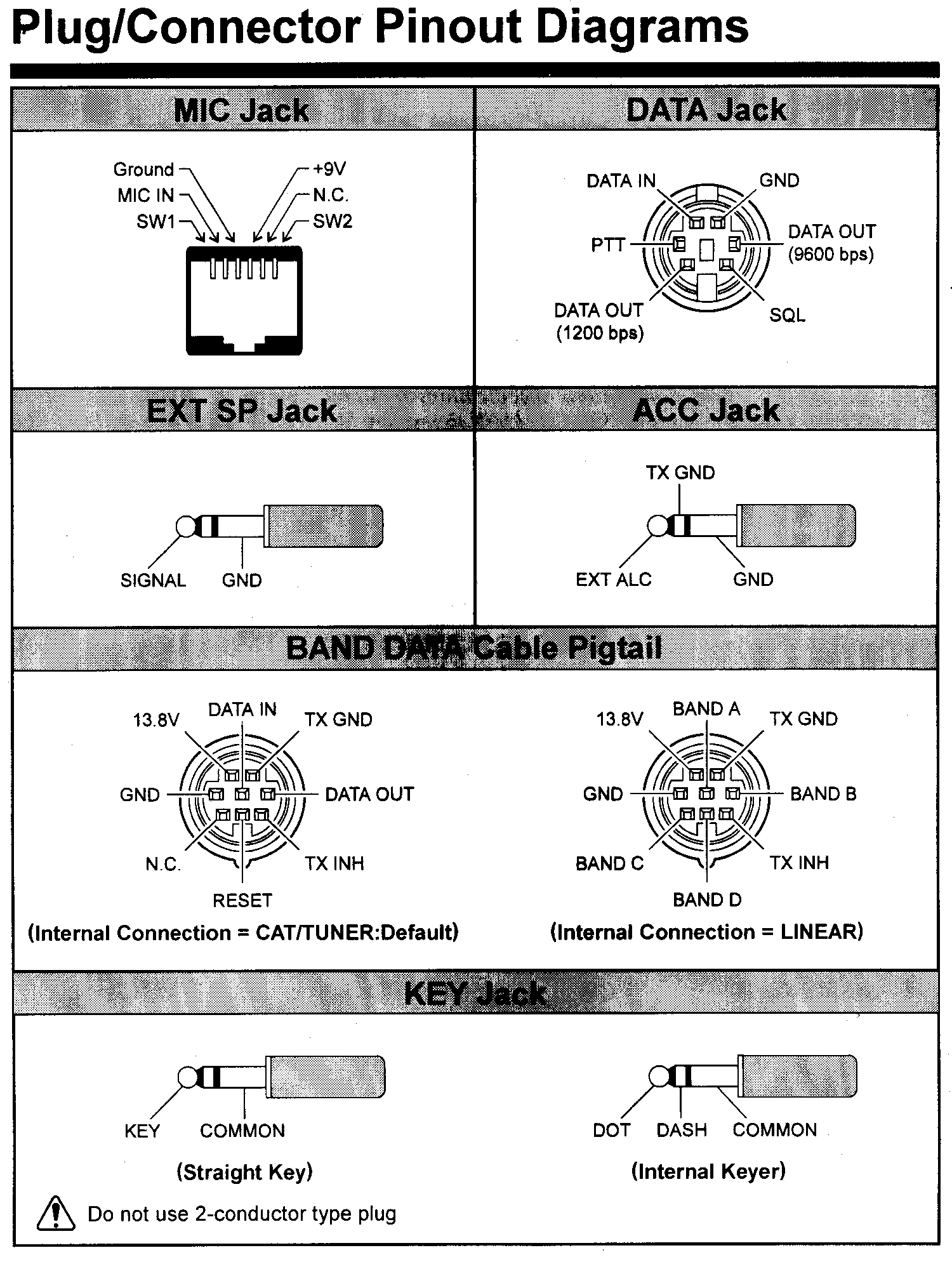
FT-891-Mic-Pinout-TT3+-Connect.pdf Nearly impossible to find mic jack pinout info for Yaesu FT-891 HF+6 transceiver, also connection info for Byonics TinyTrack 3 APRS tracker.
Ham Radio Deluxe
Final free version of HRD "rescued" from HRD website at http://www.hrdsoftwarellc.com/ before Ver 5.x archives are deleted. (Current ver 6.x is no longer free.)
Final versions of these documents in PDF form. (No release notes were available for Ver 5.24.38)
I-Dont-Want-Windows-10.ZIP Information on the high-pressure "Get Windows 10" campaign being forced upon Windows 7 & 8 users, and tools to remove the invasive and space-wasting crapware being stealth-loaded on Win 7 & 8 systems.
KenBeeps.zip WAV file recordings of D700 two-tone beeps to make UIview sound like a D700 on incoming or digipeated stations.
Kenwood-8-Pin-Mic-Jack.pdf Use as a worksheet for wiring Kenwood-compatible 8-pin panel jacks.
Ken-6-Pin-Ant-Tuner-Port-to-AH3-AH4.pdf
Extremely simple interface to use Icom AH3 or AH4 autotuners
with the 6-pin ext tuner port on Kenwood radios.
Kenwood-ACC1-Cat-Cable.pdf Ultra-simple Kenwood CAT cable assembly.
Kenwood-ACC1-CAT-Cable-USB.pdf Newer USB version for "legacy-free" PCs without serial ports.
KenMic Plug 8.gif Use as a worksheet for wiring round Kenwood-mic-jack-compatible plugs.
Kenwood-8-Pin-Mic-Plug.pdf Same as above in PDF format.
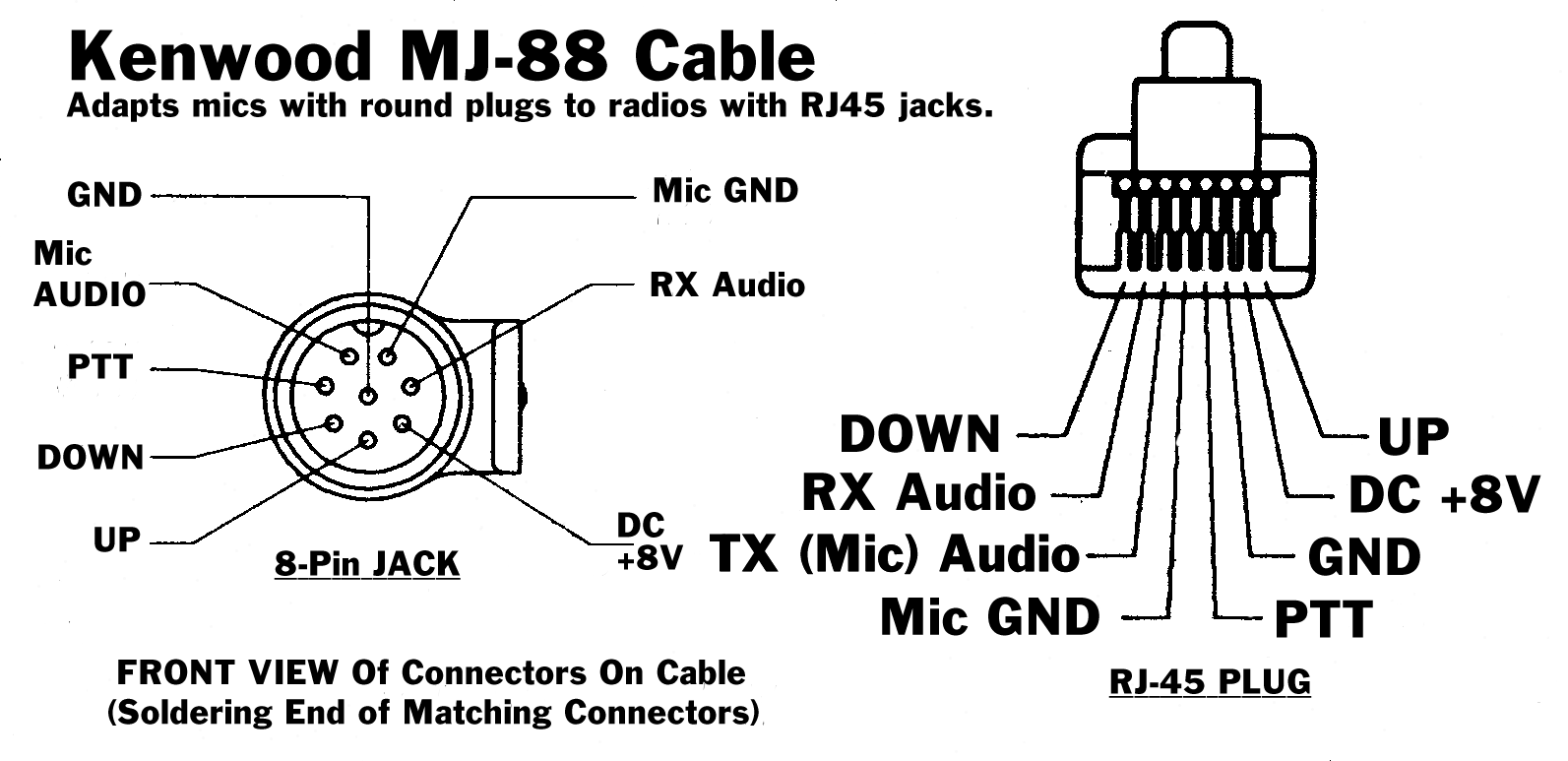
Kenwood MJ-88 "RJ-45" to 8-Pin-Round Mic Adapter
KI6GD Magloop Antenna Calculator
This tool, saved from the now-defunct website "magloop.com, lets you experiment with various combinations of shape, size and materials and their effect on radiation efficiency, when designing compact magnetic loop antennas.
KLM-27el-UHF-BandPass-Yagi-Manual.pdf
Compiled Quick Basic program to reset TNCs from KISS to normal command line mode. Because this is a compiled DOS program, it is a 16-bit application. It will run in versions of Windows up to WinXP SP3 but not later. (Vista and higher will not run programs that contain 16-bit code) Because this app is a legacy DOS program, it is limited to the first 4 com ports (COM1 to COM4).
TNC2-119b-8N1Mod.zip Last version ever of TAPR TNC2 firmware. Works in MFJ-127x TNCs.
MI-Digital-Traffic-Net-Info.pdf Try out the Olivia and MT-63 digimodes here!
MI-ARRL-HF-Digital-Modes-Presentation-01-May-14.pdf
PDF copy of PowerPoint presentation delivered to various radio clubs.
NetBUI_Add.exe Restores support for NetBEUI to Windows XP.
Microsoft quietly dropped support in XP for the Netbios Extended User Interface (NetBEUI) network protocol (which had been used all the way back to Windows 3.11), in favor of pure TCP/IP-based networking. This makes it impossible for networked XP computers, to see Win98 and earlier machines. [Windows 2000 still had support for NetBEUI, although it isn't enabled by default.]
Hard-to-find UIview plugin. Extracts single call sign from UIview stations list, converts to standard NMEA format and outputs it to a virtual COM port for use by any standard GPS- driven mapping program.
PS2.pdf PS/2 Keyboard jack pinout - use to steal 5VDC from a keyboard jack on laptop.
This application was developed by G4IDE as an experimental add-on for UIview in early 2001. It combines a PSK31 "waterfall" soundcard application with a TCP/IP interface, and was intended to allow APRS operation over HF PSK31. This was only a "quick-hack" experiment that was never intended for prime time. A much more advanced approach to APRS-over-PSK (that is under current development) is here .
TNC2_Alignment.PDF (from BuxComm/PacketRadio.com)
Precision Mapping Server Ver 9.0 For UIview
Latest version of this UIview plug-in, that is required to use Undertow Software's Precision Mapping Ver 9.0 with UIview 2.03.
RestoreWinhelp32.exe Restores the WinHelp32 player required to display old-style Windows .HLP-format help files in Windows Vista, 7, 8 and 10, including the help system in UIview and many other legacy programs. (Windows Vista and later quietly dropped support for the .HLP format in favor of compiled HTML ".CHM" files displayed by Internet Explorer.)
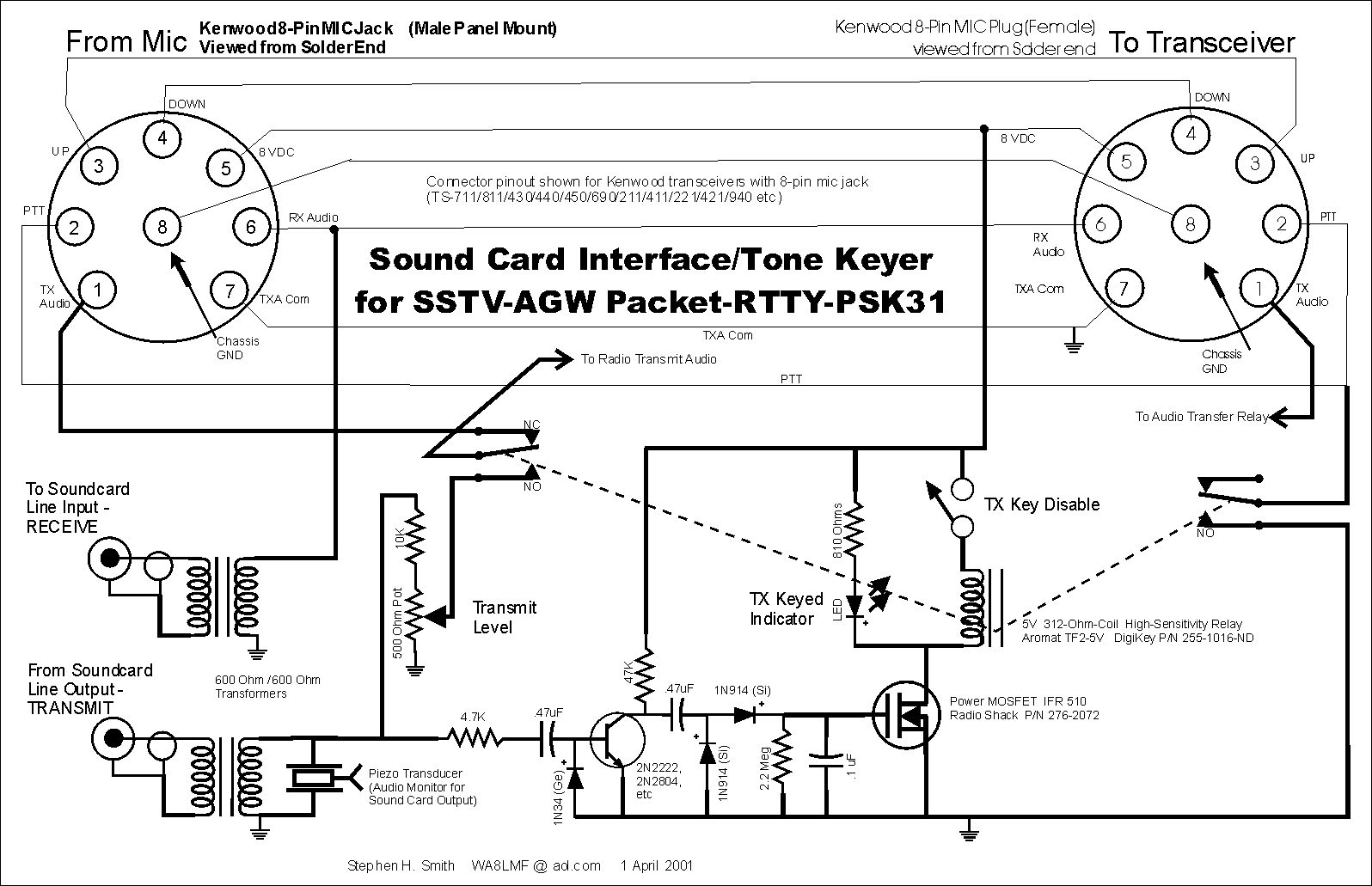
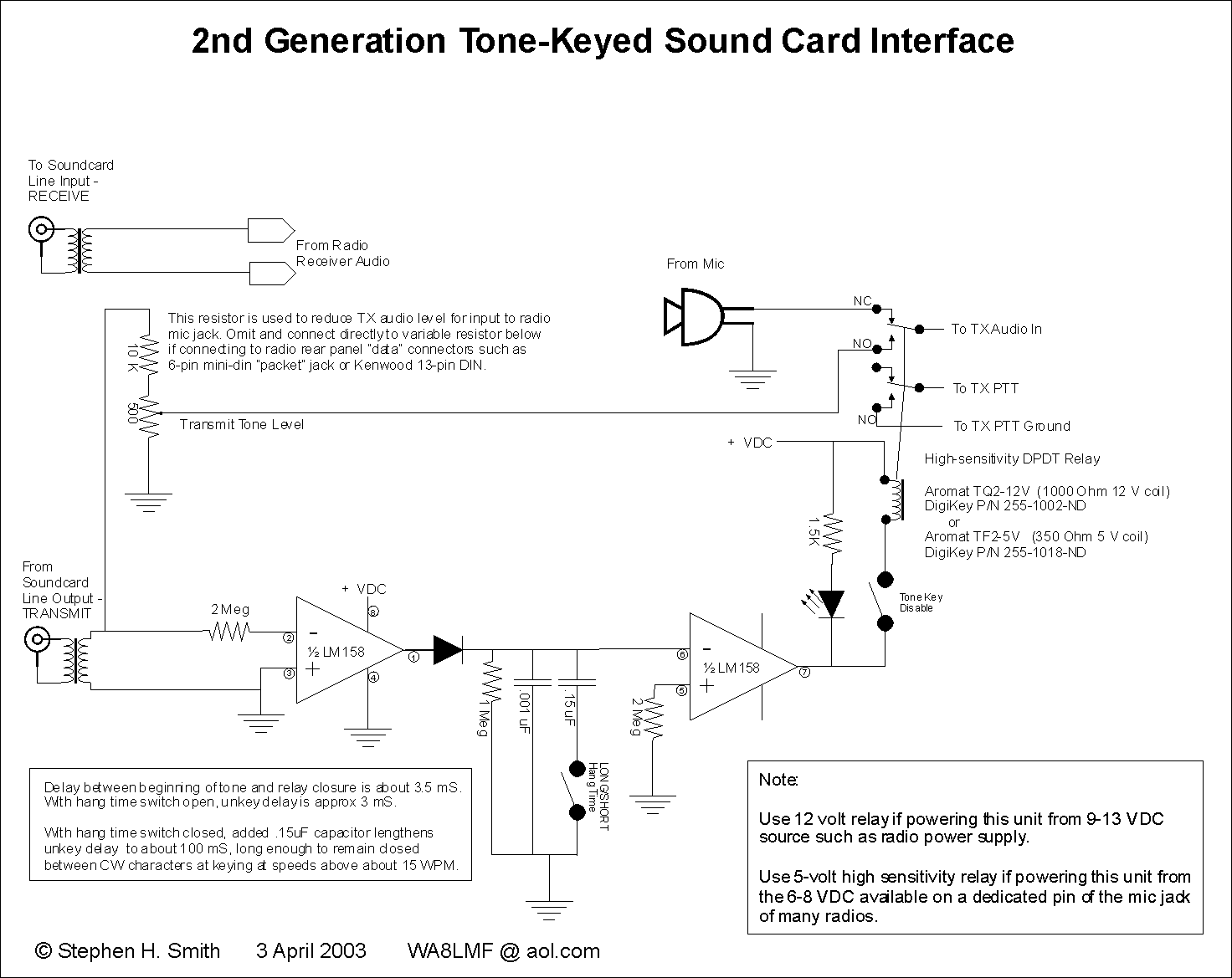
Tone-Keyed_Soundcard_Interface.PDF
Ubuntu-Xastir-VirtPC.exe Self-extracting RAR archive of a virtual machine.
A complete Ubuntu 10.04 setup with Xastir 2.04 installed and ready-to-run in Microsoft Virtual PC 2007. Warning: Large file download (1.3 GB). Lets you try Xastir in it's native environment (Linux) on any Windows XP, Vista or 7 setup without changes to Windows or hard disk partitioning.
Universal Soundcard Interface Cable Diagram
Solves several problems when connecting a radio's speaker or headphone output to a computer sound system MIC input for sound card digital modes.
A bundle of all the files required to create replacement firmware eproms for TNC-2-type TNCs to convert them into dedicated APRS digipeaters. This bundle is packaged as a typical Windows "wizard"-type installer that creates a folder of files, creates a Windows start menu entry, and displays a READme file.
A capture of my web pages dealing with UIview and Precision Mapping 8.x, into a PDF file for off-line reference.
UIview TNC initialization files for Kenwood TM-D700, TM-D710, TH-D72 & TS-2000.
A repack of G4IDE's UIview plugin, released in 2002, that allows UIview to pass position reports to Microsoft MapPoint. The original install package wouldn't work on 64-bit versions of Windows. This one will. Also includes the WA8LMF "Rev H" updated APRS symbol set. Otherwise the program itself is unchanged.
A UIview add-on from the now-defunct "Colorado Ham" website, that estimates the expected useful APRS communications range, based on the amount of traffic heard off-the-air. It draws a circle known as an "Aloha" range circle on your UIview map, centered on your own station. Note that this display is meaningless on an Internet-only-connected station. (The calculation is based on the % of air time occupied by transmissions on an RF channel, before collisions between stations transmitting at the same time starts limiting the throughput.
A soundcard software KISS TNC for 300 and 1200 baud packet that is a direct drop-in replacement for the AGW Packet Engine in programs such as UIview, APRSpoint, etc. Features tunable audio tones (useful on 300 baud HF) and can transmit & receive on two frequencies/radios at the same time with a stereo sound card input and two sound card interfaces. Has a BUILT-IN received packet monitor that makes the application self-contained for monitoring and trouble-shooting packet/APRS activity. Dual TCP/IP servers emulate both the classic AGWpe interface and a standard KISS-over-IP interface on separate configurable IP port numbers.
As of ver .84b,, the Soundmodem has the ability to send/receive 600 and 2400 baud AX.25 AFSK as well as the usual 300/1200 baud modes. Additionally, it can send AX.25 packets over a variety of BPSK and QPSK modes.
As of ver .94b, the program can function as a basic digipeater with no additional software required.
As of ver 1.05, the program now has an additional DLL that supports PTT via CAT with many modern transceivers. I.e no VOX or serial port RTS pin keying required.
As of ver 1.13, the program can now decode/encode FX.25 (the forward error correcting version of AX.25 .)
Note that this is a repack of UZ7HO's original basic zipfile requiring hand installation, into a full-blown Windows "wizard"-type installer that automatically creates a folder, desktop shortcut, Start Menu entry, and includes the Users Guide.
UZ7HO Hi-Speed Soundmodem Ver 0.27
A G3RUH 9600 & 19200 baud version of the Soundmodem. Note that these modes directly modulate the FM carrier; no audio tones are used. As a result, transmit & receive hookups to the radio must be DC-coupled direct connections to the transmit modulator and receiver FM discriminator. You CANNOT connect these modes through normal "soundcard interfaces" or radio mic/speaker jacks. The 6-pin mini-DIN dataport present on many radios provides the the type of connection required.
A split-screen send/receive terminal program for use with the Soundmodems above. Useful for classic non-APRS connected packet operation. Includes the YAPP file transfer protocol and a basic packet mailbox system.
Verizon-Cellphones-As-Modems.pdf
Windows 10 Upgrade Nagware & Unwanted Software Removal Tools
Win2000_Services_Information_REV4.pdf (from BlackViper.com)
WinXP_Services_Information_REV4.pdf (from BlackViper.com)
The Black Viper domain seems to be back online. Latest online versions of these documents are here:
Windows XP and 2000 Services Guides
Many of the files linked above are in Portable Document File (.PDF) format.
Most people automatically use the grotesquely bloated, slow-loading and security-challenged Adobe Acrobat Reader to view these files. There are several smaller, faster alternatives.
A small, fast-loading alternative is the freeware Foxit Reader. This program is a fraction of the size of Acrobat and loads nearly instantly. Download from:
https://www.foxitsoftware.com/pdf-reader/
An even smaller (less than 10 MB!) lighter alternative (but with fewer editing features) is the Sumatra PDF Reader. This open-source program also reads several varieties of e-books.
https://www.sumatrapdfreader.org/free-pdf-reader.html
These PDF readers install themselves to operate in two ways:
| Left-Clicking the link to a PDF will open the PDF file in your web browser. If Acrobat or another PDF reader is not installed, you will be prompted for a normal file download instead. | Right-Clicking the link to a file and choosing "Save Target As..." will initiate a file download to copy the file to your hard drive for off-line viewing or printing. |
This file format is independent of computer, operating system, or application programs. PDFs can accurately reproduce highly-formatted pages produced by advanced word processors or desktop publishing programs. Unusual fonts (including non-Latin character sets) used in the original composition are embedded in the file, and will reproduce correctly, even if the font is not present on your system. PDFs can also reproduce smoothly-scalable vector images (not jagged pixelated bitmaps) of technical diagrams produced by CAD, draw and mapping programs without needing the original program. At print time, the image can be automatically re-sized to the actual paper size regardless of the original layout size.
PDFs are created from any program by issuing a "Print" command and selecting a virtual printer driver rather than your actual printer. A virtual printer driver called the "Distiller" is part of the full (purchased) version of Acrobat. It is actually a specialized PostScript printer driver that captures print output into a PDF file instead of sending it to a real printer.
An open-source FREE alternative for making PDFs from any program is the "PDF Creator" virtual printer driver available here:
WARNING: Beware of the crapware page that tries to install unwanted unrelated software when running this install.