| WA8LMF Home Page | WA8LMF Resume | Main APRS Page | HF APRS Operation | Updated 07 July 2026 |
| UPDATE: Dayton Hamvention 2026 presentation on VARA and the VARAtrack on KM4ACK's You Tube Channel |
The VARA soundcard "soft-modem" has been shown to be orders-magnitude superior to traditional 300-baud AX.25 packet radio on HF for transmitting APRS position reports and data.
Traditional packet requires a fairly strong signal to be received reliably on HF because it incorporates NO forward error connection (FEC). FEC is data added to a packet that allows a corrupted packet to, in many cases, be repaired at the receiving end without retransmitting it.
APRS makes the problem even worse. It exclusively uses
the unconnected packet protocol known as "UI" (Unconnected Information) frames.
This is one-way one-to-many "broadcasting" to anyone and everyone
within range. There is no two-way handshaking with other stations. There is no
mechanism for negative acks and requests-for-retransmission from receiving
stations that classic "connected" packet uses.
Without either FEC or ACK/NAK, the receive success rate
for packets is rather poor. All the receive station can do is reject the damaged
packet and wait until the sending station decides to beacon again minutes later.
The VARA modem wraps transmitted data in multiple levels of FEC, and uses powerful digital signal processing on received audio signals. The signal processing "horse-power" in current consumer PCs would have been unthinkable even just 10 or 15 years ago. VARA can produce reliable copy on signals so weak, you literally can not hear them in the radio speaker. (VARA has weak-signal capability similar to FT-8.)
For at least 30 years, a simple transmit-only APRS tracker device (the Byonics TinyTrack) has been used on both 1200-baud VHF and 300-baud HF packet to easily transmit APRS tracking beacons. You plug a serial GPS device into one end of the box. Transmit audio & PTT (Push To Talk; i.e. transmit keying) lines to the radio come out the other end. The device is based on a PIC microcontroller chip.
VARA is vastly superior for weak signal operations, but it exists only as a Windows "sound card" application that runs on PCs running Windows 7 or higher. Running a mobile tracker has required using a Windows laptop or tablet. There is no dedicated hardware device similar to a TinyTrack that can run VARA. Some individuals have run VARA on Raspberry Pi single board computers. This is basically trying to hammer a round peg into a square hole since Raspberry Pis run a variation of the Linux operating system. Further, they use non-Intel ARM processors. Various middle-ware "kludges" (and an emulator to "fake" an Intel or AMD-type x86 processor on an ARM CPU) are required to make Windows programs run on a "Pi". This is even more problematic when the application in question (VARA) is doing real-time timing-sensitive digital signal processing.
Recently, very cheap ultra-compact Windows-based PCs
known as "stick" computers have become available. These devices can be had
starting around USD $130. Unlike Rasberry Pis, these devices can run standard
Windows operating systems and Windows applications on a 64-bit Intel processor. (They can also run standard
desktop x86 Linux distros like Ubuntu and a version of Android.)
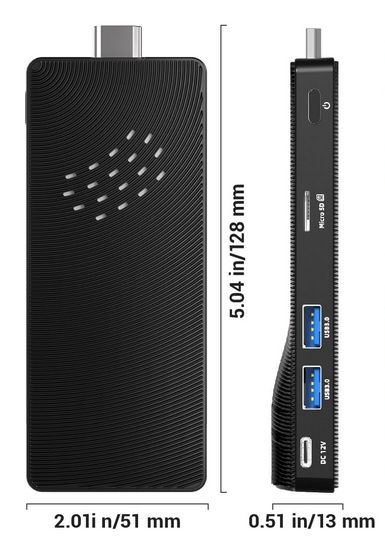
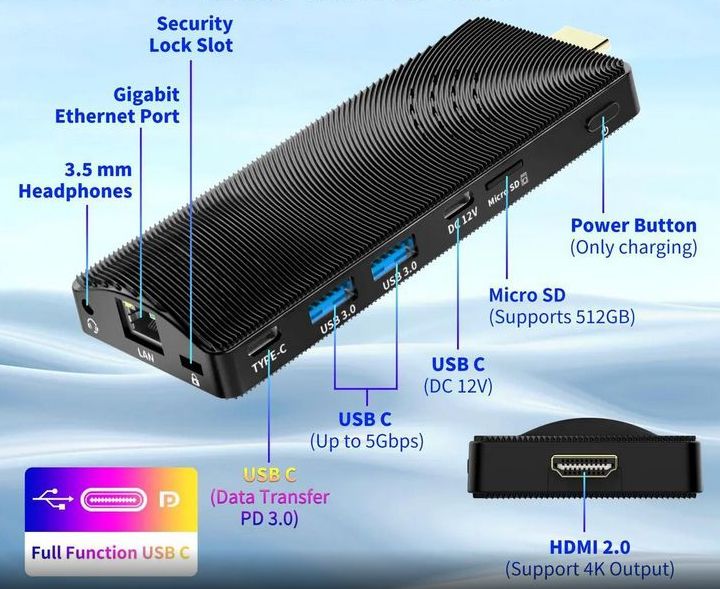
The stick PC I used include a 4-core 1.5 Ghz 64-bit Celeron
processor, record/play sound system, Ethernet, WiFi, Bluetooth, an HDMI video
port and two USB 3 ports, 2 USB-C ports, These devices are used with the 42" TVs
used as menu displays over the counter at fast-food places and in flight
schedule displays at air ports. They are also used in electronic signs in conference
centers. A version of this device is also the heart of the digital "GeoChron".
This is the manufacturer's web page for the "Higole Mini-PC" device I used:
<https://goleminipc.com/products/higolepc-mini-pc-stick-intel-celeron-j4115-windows-11-usb-pd3-0-hdmi-4k-gigabit-ethernet-wifi-5-0-bt-5-2-for-office-home>
This device has 4GB of RAM and and a 64 GB eMMC "hard disk". A more expensive version provides 8GB RAM and a 128 GB hard disk. (The lesser model is more than adequate for the VARAtrack application. It also works well as a "media PC" for Internet streaming into a 4K TV.)
The same version of the Higole stick PC is here on NewEgg.com: <https://www.newegg.com/higolepc-4gb-64gb/p/2SW-009E-00001>
Note that the similar-looking offerings on Amazon for this device are an older version that lacks the 2nd USB-C "full-function" port.
The device comes pre-loaded with a version of Windows 11. I re-formatted the drive and installed from scratch a bare-bones Windows 10 installation. I removed all of the Windows 10/11 "fluff" including all the Microsoft Store "apps", Cortana, One Drive, and all the AI / Copilot stuff. I then installed VARA, VSPE (virtual serial ports emulator), UIview 2.03, Visual GPS, and Precision Mapping 9.0. It all fit easily into even the most basic version of this stick that has only 64GB of eMMC "hard disk" and 4 GB of RAM. Note that doing away with the grotesque bloat of Windows 11 helped substantially in making even the most basic version of this stick (4GB RAM/64G HDD) usable for this application.
Further, since Windows 10 is at end-of-life, you will not be unexpectedly "ambushed" by unsolicited forced Microsoft feature updates. These requently disrupt audio settings on Windows 11 setups, if you connect the device to the Internet. Since you are (hopefully!) not promiscuously surfing the Internet or receiving email with this device, the security risk of using an older version of Windows is minimal.
The Windows Scheduler is configured to automatically start all the apps needed in a controlled sequence when the "stick" is powered up.
VARA is set to use the internal sound system for both transmit and receive. The sound system outputs and inputs audio to a single 3.5 mm 4-contact "TRRS" jack, similar to the headset jack on a cell phone. Since there is no PTT (push-to-talk) line, the associated radio needs to be set to use a VOX function to key the transmitter. I made up a cable that goes from 3.5MM TRRS plug to 6-pin mini-DIN data port on the radio.
[Several Yaesu HF radios including the FT-857 and FT-891 include a "data VOX" function selectable from radio menus. This feature only responds to audio sent into the rear-panel "data port". It has far faster RX-to-TX and TX-to-RX turnaround times than the normal voice VOX function used with the microphone.]
If you need hardware PTT control, you could plug either a SignaLink (which has it's own VOX) or a DigiRig (which will provide hard PTT keying over a virtual COM port) into one of the USB ports on the stick.
(The DigiRig combines the TX/RX audio connections and the virtual com port PTT connection over a single USB connection to the computer. DigiRig provides an available cable that connects both TX/RX audio and PTT from the single 3.5mm radio port on the DigiRig to the 6-pin miniDIN "data port" on the radio.)
In either of these scenarios (SignaLink or DigiRig), you will need to use a Bluetooth mouse/keyboard since the stick has only two USB-A ports. These would normally be used for a USB-connected GPS, and the 2.4 GHz "dongle" for the mouse/keyboard. (The stick has Bluetooth 5.0 .)
This is a complete desktop Windows 10 install, albeit in a very small form factor. One can run it "headless" as a transmit-only APRS-over-VARA tracker. Or connect an HDMI monitor and be able to monitor receive activity as well. My install includes Precision Mapping 9.0, providing seamless street-level mapping of ALL of North America without an Internet Connection.
This device has an advanced "full function" USB-C port.
A "full-function USB port supports HD-monitor-video-over-USB, audio in/out, DC power,
and normal USB data simultaneously.
A single
USB-C-to-USB-C cable can connect both 1920x1080 HD video -AND- provide DC
power to a modern USB-C-connected monitor. This is especially convenient
for mobile or battery operation, since a single 12VDC power
connection can power both the stick itself, and the connected monitor. The total
power drain is about 0.5 amps (6 watts).
Or you can use a conventional two-cable hookup to the stick using the HDMI port of the stick for video, and an external power source for a conventional HDMI monitor or TV.
This is the Amazon page for a "KYY" monitor that will
work this way with the stick:
https://www.amazon.com/Portable-Monitor-Upgraded-Ultra-Slim-Speakers/dp/B088TLQR3K
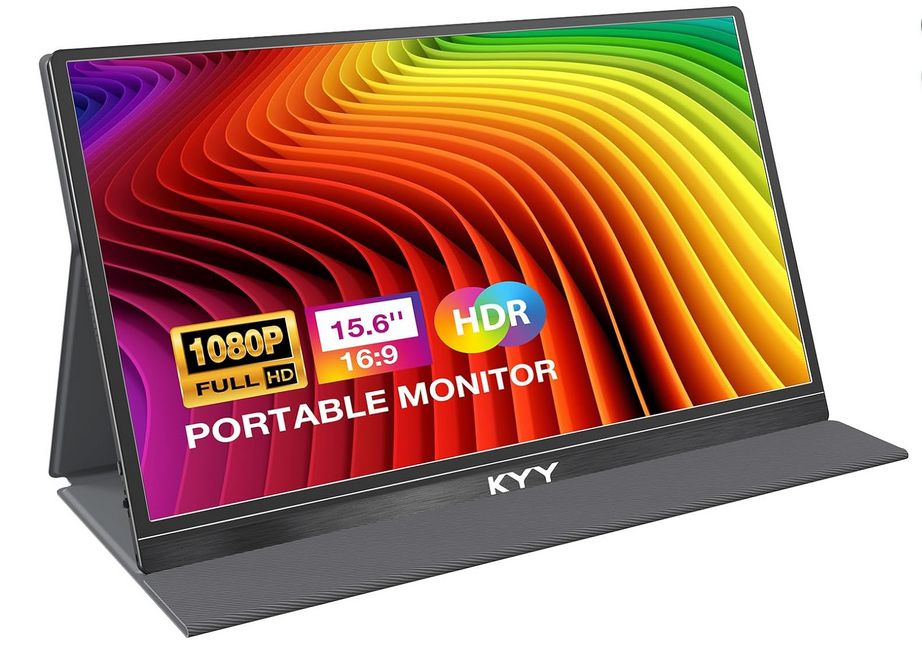
It's basically the thin display panel from a 15.6" slim laptop packaged separately. It is barely 1/4" thick. It comes in a clever folding slip case that doubles as a stand. It can accept video input through a mini-HDMI port and power through a USB-C port from a standard USB phone charger -or- both video and power through the full-function USB-C port. This device sells for around USD $70 from Amazon.
[Many new laptops (and the stick PC) now support this combined video + power over USB-C. This kind of port, which can carry USB data, power, video and audio at the same time, is referred to as a "full-function" USB-C port.]
This setup has enormous flexibility:
Since the stick PC has Ethernet and WiFi, the installed UIview program setup can also function as an igate if run at home connected to the Internet. As a home station igate running 24/7, the power consumption is only 6 watts (0.5 amps at 12 VDC) for both the stick and the monitor!
When this system is started with a monitor attached, this is the default Windows desktop that will appear on a 1920x1080 full-HD screen (reduced here to half-size for online Web display).
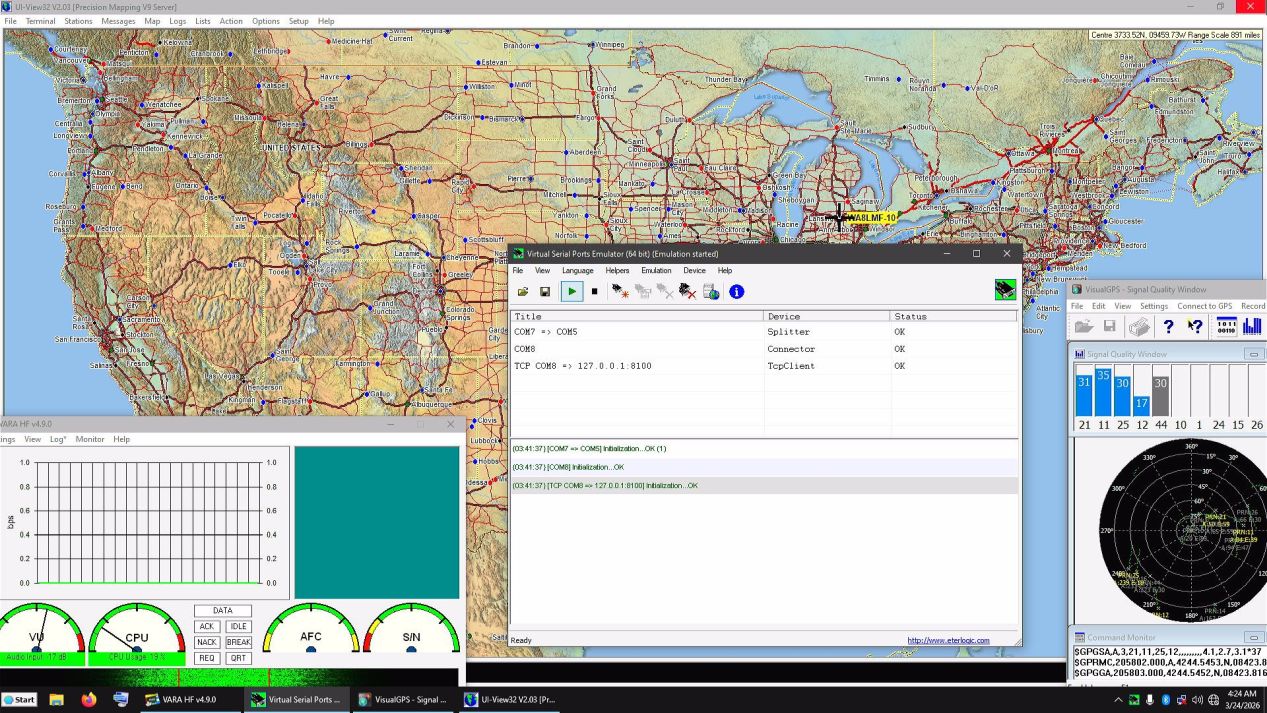
Programs started automatically by the Windows Scheduler app include:
The "UIview32" APRS application is
running in the background.
The VARA modem showing at the left.
The "Visual GPS" GPS-monitor
program, in the center of the screen is displaying the status of the GPS
receiver.
In the center, "VSPE" (Virtual Serial Ports Emulator) is showing. This program translates the KISS-over-IP output of VARA to the KISS-over-serial-port format required by UIview. VSPE also splits the GPS data received over USB on a virtual COM7 to multiple outputs on COM5 to provide GPS data to both "UIview" and "Visual GPS" at the same time. Normally, this program is hidden behind the UIview map.
To make this setup more usable as a
general-purpose "ham workstation" when a keyboard, mouse and monitor are
attached, many other ham programs and utilities have also been installed.
These include VARA-FM, Vara Chat, VarAC Chat,
the complete FLdigi suite, WSJT-X (FT-8), mmSSTV, EasyPal
"digital SSTV", a soundcard scope and audio generator, an audio
recorder/player, a network monitor tool, an Internet time-setting
tool, a direct desktop shortcut to the Windows Scheduler, and more.
| NOTE: The stick PC does not have a
battery-backed internal hardware clock like normal desktop and
laptop computers. At boot, it attempts to set the system clock from
the Internet. If no Internet access is present, it will default to a
date and time years in the past!
Since an NMEA GPS device will be connected for tracker duty, this guarantees that the date & time can be set correctly - even in the field with no Internet access. |
You can use any of these other programs by exiting the ones in the bullet list above, that start automatically at boot. With all these programs installed, over 30 GB of the eMMC "hard disk" remain free.